
修改Pug模板/blog/blog/themes/butterfly/layout/includes/header
为了能够正确地处理 _config.yml 中的数据,稍微调整一下 Pug 模板中的循环部分。
each socialItem in theme.social |
这里的关键点是:
我们使用 socialItem(即数组)来迭代每个社交链接设置。
第一个元素 (socialItem[0]) 是图标类名。
第二个元素 (socialItem[1]) 是 URL。
第三个元素 (socialItem[2]) 是标题(可选)。
第四个元素 (socialItem[3]) 是颜色(可选)。
完整的 _config.yml 示例
为了确保一切都按预期工作,这里是完整的 _config.yml 示例:
Social Settings (社交图标设置)
social: |
调试步骤
保存文件:确保您已将这些更改保存到 _config.yml 和 Pug 模板文件中。
清理并生成:运行 hexo clean 清理缓存,然后运行 hexo g 生成静态文件。
启动服务器:运行 hexo s 启动本地服务器来预览网站。
设置文章优先级
1:下载插件
npm uninstall hexo-generator-index --save |
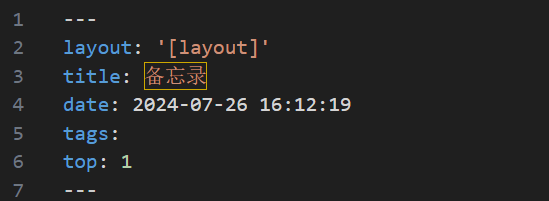
2:设置文章的优先级
/source/_posts/(要修改编辑的博客)
然后打开了这篇博客,加上top属性,top后面数字越大优先级越大
--- |
Butterfly 添加全局吸底 Aplayer
卸载 hexo-tag-aplayer 插件
在Hexo站点根目录执行以下卸载hexo-tag-aplayer命令,使用 CDN 的方式引入
npm un hexo-tag-aplayer |
打开 Butterfly 主题配置文件_config.butterfly.yml,进行以下修改…
# Inject the css and script (aplayer/meting) |
# Inject |